Graph Refinement
Graph refinement reduces the word-document graph before training — removing low-quality word nodes and pruning weak edges. This can reduce training time, decrease overfitting, and sometimes improve accuracy.
For the full API reference see RefinementConfig.
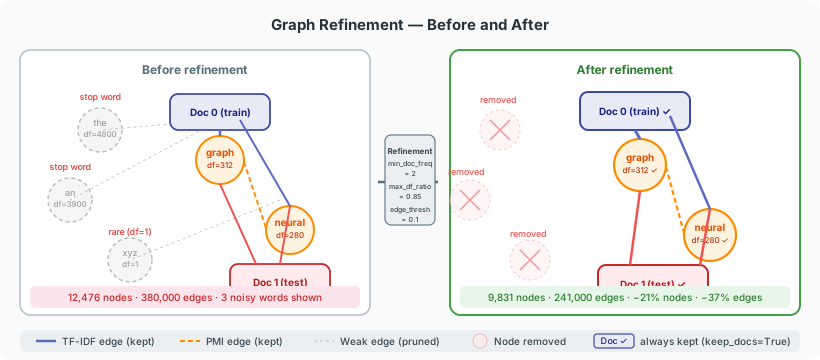
When to use refinement
| Symptom | Suggested filter |
|---|---|
| Training is slow due to large graph | min_doc_freq, edge_weight_threshold |
| Common function words dominate features | stopwords, max_doc_freq_ratio |
| Sparse long-tail words add noise | min_doc_freq, min_word_degree |
| Hub nodes distort neighbourhood aggregation | max_word_degree, top_k_edges_per_node |
Refinement is optional. The default TextPipeline already applies rare_count filtering; refinement lets you apply additional graph-level constraints without re-running the pipeline.
Applying refinement via GNN
The simplest way is to pass a RefinementConfig to GNN. Refinement is applied after loading the corpus, before training.
from text4gcn import GNN, Builder, RefinementConfig

result = GNN(
    dataset_name="R8",
    dataset_path="data/",
    builder=Builder.Tfidf,
    refinement_config=RefinementConfig(
        min_doc_freq=2,              # drop words in fewer than 2 docs
        edge_weight_threshold=0.1,   # drop very weak edges
        keep_docs=True,              # never remove document nodes
    ),
).fit()
Filter reference
Dropping rare words
Drops word nodes that appear in fewer than 2 documents. Equivalent to min_df=2 in scikit-learn vectorisers.
Also drops words that appear in more than 90% of documents (equivalent to max_df=0.90).
Dropping by node degree
Drops word nodes whose weighted degree (the sum of their edge weights) is below 1.0, including isolated words.
Drops hub word nodes with degree above 5000 — extremely connected words that dilute neighbourhood information.
Same test on every node's weighted degree. With keep_docs=True (default) document nodes are exempt, so it only drops words; with keep_docs=False it can drop documents too.
Edge pruning
Removes all edges whose stored weight is below 0.05 — whatever the builder stored: TF-IDF for word–document edges; PMI (tfidf()), count / max count (RWF builders) or cosine similarity (cosine_similarity()) for word–word edges.
Keeps only the 10 heaviest edges per node. Creates a sparser, cleaner graph. An edge survives if it is among the 10 heaviest of either endpoint, and keeps its original weight.
Stopword filtering
RefinementConfig(
    stopwords={"the", "a", "an", "is", "in", "of", "to"},
    vocab_path="data/R8.shuffled/R8.vocab",
)
Drops word nodes for any word in stopwords. The vocabulary maps word strings to vocabulary indices: vocab_path is optional — when it is None, the vocabulary is read from <dataset_path>/<dataset_name>.shuffled/<dataset_name>.vocab. GNN always passes dataset_path and dataset_name; with apply_refinement, pass them (or vocab_path) yourself, otherwise stopwords silently does nothing.
Drop / keep by vocabulary index
RefinementConfig(drop_word_indices={0, 1, 5, 100})
RefinementConfig(keep_word_indices={10, 20, 30})  # whitelist; all others dropped
keep_word_indices decides alone for word nodes: the other word filters are ignored. min_degree / max_degree still apply first.
Always keep document nodes
When True, document nodes (train and test) are never removed regardless of other filters. Set to False only if you have a specific reason to filter documents.
Combining filters
All filters are applied together. Order of application:
- Global degree filters (
min_degree,max_degree) - Whitelist (
keep_word_indices) — if set, it alone decides which word nodes stay and steps 3–6 are skipped - Word-only degree filters (
min_word_degree,max_word_degree) - Document frequency filters (
min_doc_freq,max_doc_freq_ratio) - Index filter (
drop_word_indices) - Stopword filter (
stopwords) - Edge pruning (
edge_weight_threshold,top_k_edges_per_node), on the graph left after node filtering
Document nodes pass all node filters when keep_docs=True.
Inspecting refinement statistics
Use apply_refinement directly with return_metadata=True to see what was removed:
from text4gcn import RefinementConfig, apply_refinement, Builder
from text4gcn.models.utils import LoadData

predata = LoadData(
    path="data/",
    dataset="R8",
    builder=Builder.Tfidf,
).load_corpus()

config = RefinementConfig(
    min_doc_freq=3,
    edge_weight_threshold=0.05,
    keep_docs=True,
)
predata_refined, info = apply_refinement(
    predata, config, dataset_path="data/", dataset_name="R8", return_metadata=True
)

stats = info["stats"]
print(f"Nodes: {stats['nodes_original']} → {stats['nodes_refined']} ({stats['nodes_removed']} removed)")
print(f"Edges: {stats['edges_before']} → {stats['edges_after']}")
edges_before counts the edges left after node filtering, before edge pruning; edges_after counts them after pruning.
info["metadata"] holds one NodeMetadata per kept node (type, original index, degree, word or document id). Pass build_metadata=False to skip it; info["metadata"] is then None.
Complete example
from text4gcn import GNN, Builder, RefinementConfig

result = GNN(
    dataset_name="R8",
    dataset_path="data/",
    builder=Builder.Tfidf,
    epochs=200,
    early_stopping=10,
    refinement_config=RefinementConfig(
        min_doc_freq=2,
        max_doc_freq_ratio=0.85,
        edge_weight_threshold=0.05,
        top_k_edges_per_node=20,
        keep_docs=True,
    ),
).fit()

print(f"Accuracy: {result.test_accuracy:.4f}")